# Zero Category On-Hands
In Some cases, it becomes necessary to zero out the entire inventory within a category. The recommended way to do this so that you have a proper paper trail is to do a 'zero' physical inventory count. You can accomplish this by following these steps.
1. Navigate to **6. Inventory > 6. Physical Inventory > 1. Parameters Maintenance**
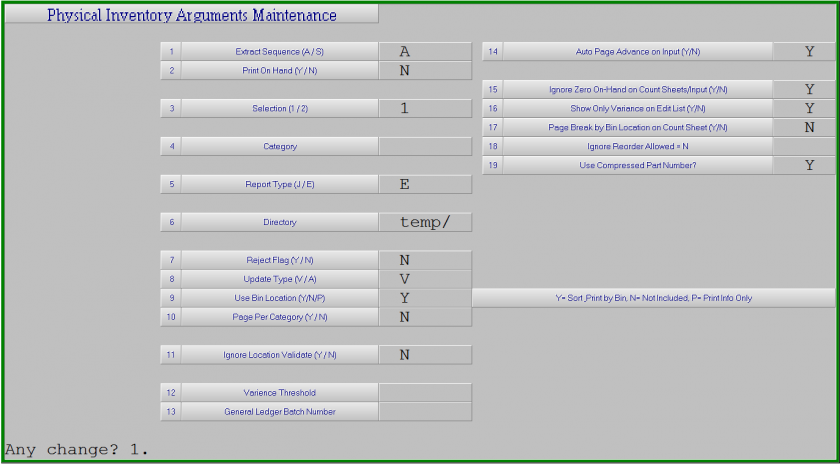
2. Adjust field 2 **Print On Hand (Y/N)** to **N**. With this set to N, when you print an inventory count sheet, it will print a zero as the onhand in the inventory count file.
3. Navigate to **6. Inventory > 6. Physical Inventory > 2. Count File Creates > 5. Multi-Cat. Count Worksheets**
4. Enter in the category you wish to zero on hands for
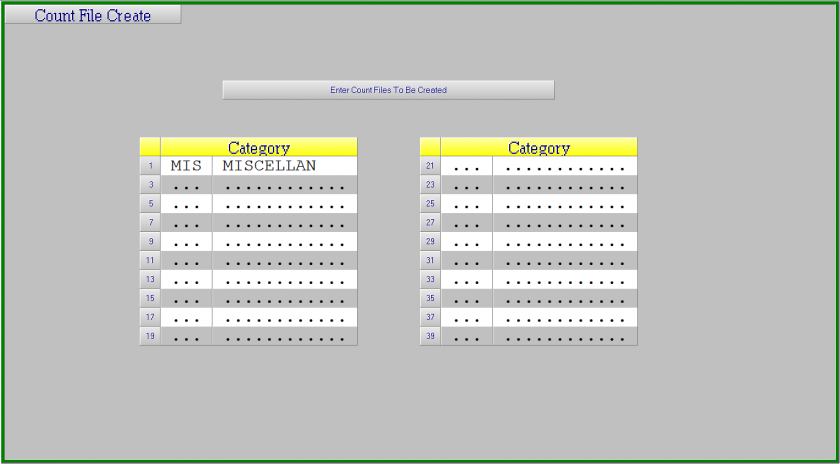
5. Pres F1 to accept the category and F1 again when asked **Any change?** to create the count files
6. When the print preview shows up, you can close the window without printing the count sheets
7. Navigate to **6. Inventory > 6. Physical Inventory > 5. Count Update**
8. You will be presented with 2 different questions to confirm that you wish to update. Please answer them accordingly to proceed:
- **Press RETURN to continue Y**: Press the Enter key
\- **Are you sure?**: Press **Y**
9. You will now see a screen with any outstanding count files. Press Enter to go into the list.
10. Press **N** next to **ALL** categories you do not wish to updateThis is **VERY** important. Updating old count files can severely throw out your counts on categories
11. Ensure that the category you DO wish to update has a **Y** next to it.
12. Press F1 to accept the changes to the list and F1 again to start processing the update.
13. You will now be presented with a listing of all items whose onhand was zeroed out. This gives you a proper paper trail for inventory adjustment and financial purposes