# Updates
# Beta V 1.1.0
The following is a listing of the updates released in the Countrpoint Cloud Platform (CP2)
### Branch Classification
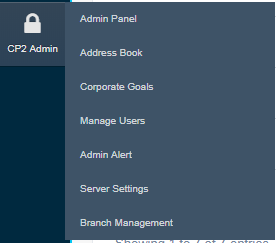
We have introduced the ability for you to group your branches by Region, Type and Size. As an admin user, you will now have access to the Branch Management module
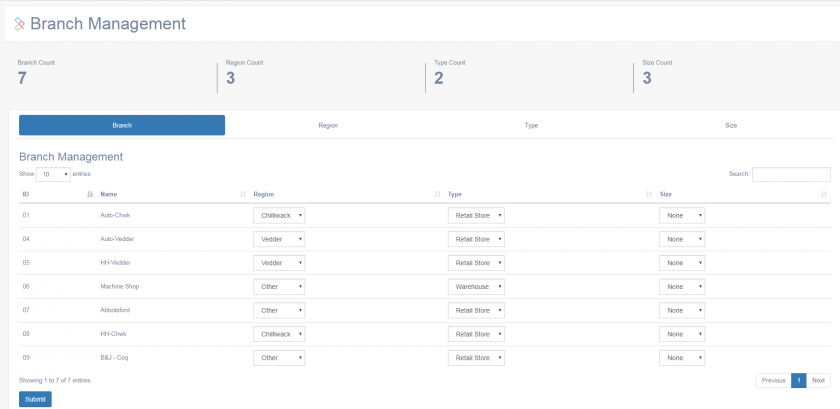
Entering into Branch management will give you a listing of all of your branches, and optional drop-down boxes to assign your branches to the various groups.
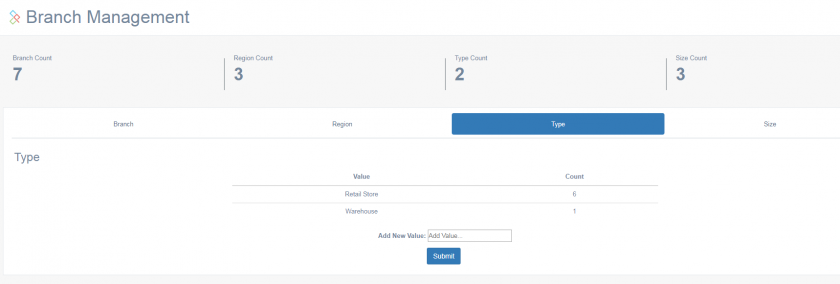
To create classifications, you can navigate into any of the Region/Type/Size headings to create new categorizations that can then be assigned to branches
### Modified Flightdeck
The FlightDeck Dashboard has been modified to focus solely on performance indicators and allow you to filter what data is used to make up your Key performance indicators. The default view is a month to date total for all accounts under your control with comparatives to the same period last year.
The new features allow you to click on the 'Current View' tab to adjust that view
Clicking the punch-out will present you with the various filtering options available to you
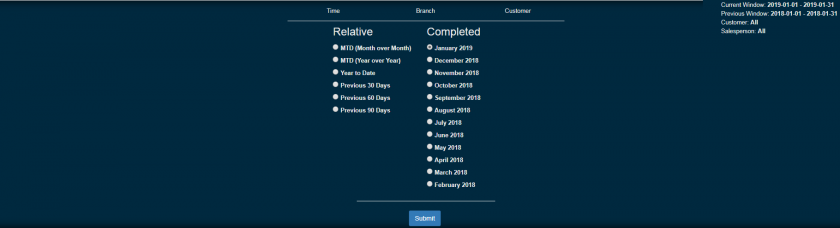
This includes changing the current period being analyzed, the comparative period it is analyzed against, the specific branch or branches that are to be included as well as specific customers to be used. As you select the options and press the submit button, your dashboard indicators will be updated with these filters.
### Enhanced Goals
With the migration of flightdeck to a more indicator focused model, the goals have been moved to their own subsection.

Navigating to the goals page will now present you with all of the current active goals applicable to your account
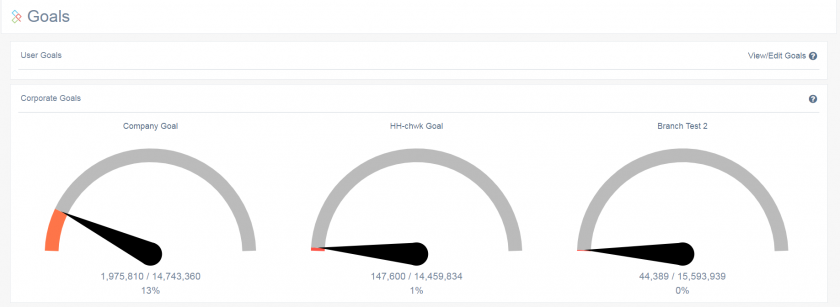
Clicking the name of any of the goals will present you with the goal detail, and clicking the **View/Edit Goals** link will let you add/maintain the goals
### Pre-built Reports
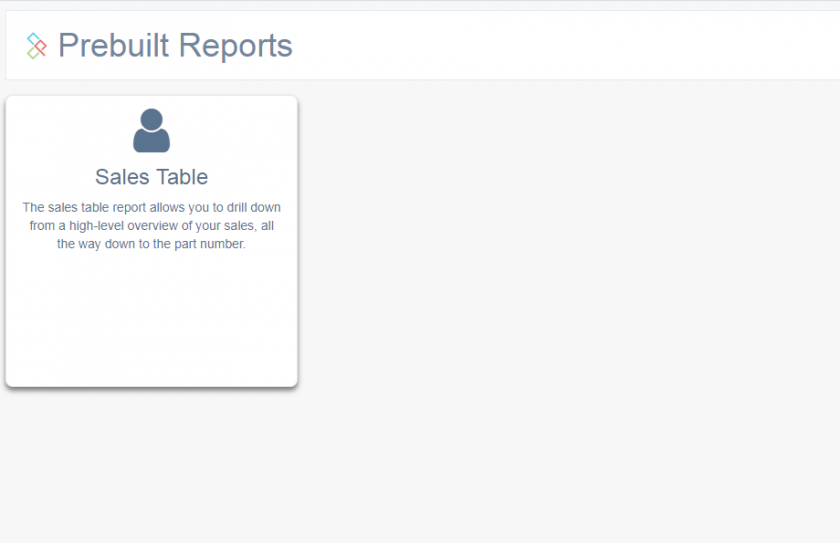
Another piece of the old dashboard was the drill-down customer sales table. This has now been moved to a section that will be expanded on in future releases.
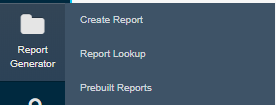
Under the report generator module, a new **Prebuilt Reports** sub-module is available. At the moment, the details sales drill-down tables is the only new report listed
\\
As feedback is received, custom reports will be placed here for user consumption.
### Expanded Report Generator
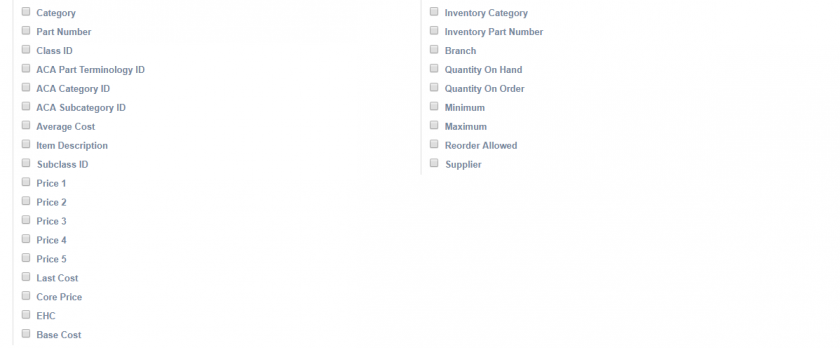
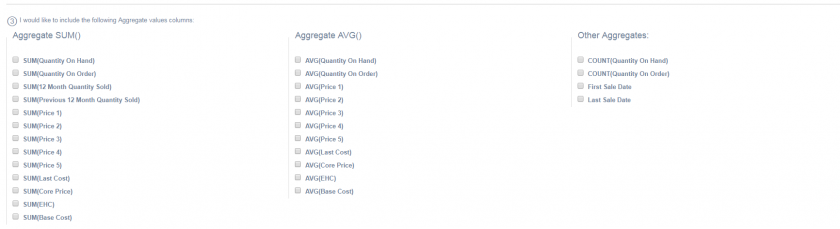
The basic Sales and Inventory reports have had numerous new detail fields, as well as aggregate fields added. Some to note are First Item Sale, Last Item Sale, Total of current 12 months sales, Total of Previous 12 months sales, all price levels and transaction types along with numerous others.
### Overnight Reporting
The weekly and monthly emailed reports within CPMailer have been modified to compare the current week/month to the same week/month of last year.
### CounterCRM
A minor addition to the CounterCRM module includes a new 'Monthly Sales History' graph that displays the customer's sales by month over the past 12 months with a comparison to the previous year
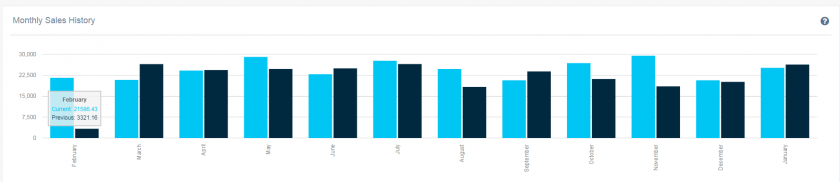
Sales comparisons have also been updated to represent a year-over-year comparison
# Beta V1.2.0
The following is a list of the feature changes from Beta V1.2.0:
#### FlightDeck Dashboard
Updates to the FlightDeck Dashboard tiles, adding a breakout for online sales and moving the tiles into a tabbed panel.

Added the GP% at the end of customer and clerk names in the Top Customers by Sales and Top Clerks by Sales graphs.
Added a second "Sales By Day" chart, totaling the cumulative sales over the period.
#### Inventory Dashboard
Added a new page onder the FlightDeck module for Inventory analytics. This includes some base metrics such as total inventory values by branch and category, top categories by value, old stock value, old stock by category, and turns. These metrics also follow the same conventions as the Flightdeck sales dashboard wherein the user can filter by branch, or group of branches. If they have already made a filter selection within the sales dashboard, that selection follows to this page.
#### Goals
Minor visual changes to create an obvious vertical break between the goals.
Also added in the target value as of today to the graph so that the gauge shows a relative point where the user should expect to be based on how far along you are in a month. This is shown as a floating number above the arc of the graph.
#### CounterCRM
System now remembers the last customer you selected. Before, once you left the CounterCRM you would have to re-select the customer if going back in. Now, you have the option to go back to any of the CounterCRM pages with that same customer or go to the customer selection screen.
Also added in a yearly sales graph by month and properly sequenced it to be reverse chronological.
#### Weekly Alerts
Same as the monthly sales alert reports (Sales down X percent, or 30/60/90 beyond a threshold), but can be sent on a weekly basis. Toggled independently of the monthly sales alert reports.
#### Report Generator
Added in the remaining fields from our import data, as well as things like first sale, last sale, average cost.
For reports generated and saved after the update, you will have the option to return to the edit menu with the report's options filled out from the saved reports list.
#### Prebuilt Reports
Historic Sales Report - Historic sales report, but month, for the past 3 years showing Sales and GP%. Able to be filtered by branch or group
Historic Inventory Report - Historic inventory report, for the past 3 years showing inventory value by month. Also able to be filtered by branch or group. Also includes line graph for visual representation.
*This data is collected independent of Counterpoint. If you would like your historical data loaded in, please contact support to discuss options.*
#### Next Release
The next release is expected to being the ability to grant users permissions to different pages and branches, as well as change the method by which new members register. If you have thoughts or opinions on how you would like to see this implemented, contact support.
# Beta V1.3.0
### CP2 Manager Module
1. Allows administrators to 'invite' new users vs. the old registration method.
2. CP Manager is also a new user permissions module that allows a company admin to create users and assign permissions to a user. This allows you to limit what modules and/or branches a user has access to. You are also able to create 'Manager' users. These users will be able to invite additional users who will be limited in their permissions based on the manager who invited them.
### Additional metrics introduced on the FlightDeck sales dashboard.
1. New Cumulative Sales graph.
### Additional Custom CPMailer report.
1. Now sales staff can elect to get their customer alert report on a weekly basis. Sent on Monday mornings.
### Additional Prebuilt Reports
1. Detailed Sales History - Shows a table of the last 6 months sales & GP% by category, indicating where sales were up or down. Information is presented in a table which features the 1 click export to CSV/Excel/PDF
2. Detailed Inventory History - Shows a table of the last 6 months inventory value, by category indicating inventory value and difference from month to month.
# V1.3.0
This release takes aim at a number of new and very exciting features aimed at adding efficiencies for your counter staff. This release also takes us out of our beta testing and to a production/live infrastructure.
### QuickDial
- Seamless integration between your AMS PBX phone system, and your ***COUNTERPOINT** point-of-sale by way of the ***COUNTERPOINT*** cloud platform.
- QuickDial launches as soon as you answer a call, using the CallerID to find the customer.
- Ability to launch a ***COUNTERPOINT*** invoice session for a customer directly from QuickDial with one click
- Launch a customer invoice, or invoice for specific ship-to
- Single screen with many pieces of customer specific info at your finger-tips
- Customer account status
- Delivery run/run time info
- Detailed invoice search
- Integration with JDispatch for visibility of current deliveries
- Last ecat access
- Pop-up notices for important notes on account
- Seamless ability to assign unlimited additional contact phone numbers to an account
### Sales FlightDeck updates
- Changes to values/headings in top card for more clarity on meaning
- Ability to customize field headings
- Persistent visibility of current data filters
### Inventory FlightDeck updates
- Add last cost to old stock report
- Add validation against 'date added' into old stock report
- Introduction of 12 month and 24 month old stock KPI cards to inventory flightdeck
- Persistent visibility of current data filters
### CounterCRM enhancements
- Ability to import call logs from AMSPBX system into CP2
- Includes Call date, duration and recording (if available)
- Ability to assign 'pop-up' notes in the QuickDial page
- Introduction of sales-rep 'focus' list.
- Ability to manually add customers to your focus list
- If enabled, 'focus' customers are listed first for quick access when browsing CRM
- Customer specific sales alert targets
- Override the system defaults on
- Sales decrease threshold
- 30 day overdue threshold
- 60 day overdue threshold
- 90 day overdue threshold
### Revamp of CPMailer management and new reports
A number of enhancement to the overnight reporting module
- Redesign of the report assignment screen
- New 'Web Report' type
- Users are sent an email and can log in to view the report
- Can create 'audited' web reports which require signatures
- Introduction of a number of new overnight reports
-
-
-
-
-
-
-
-
-
-
-
-
-
- Users who have an associated salesrep ID on their account can receive most of the existing report types only for their sales, via a second column of "User" blocks.
-
-
### ResourceCenter Rework
The ResourceCenter module has been rewritten to take advantage of some additional security measures. This also sets up some nice improvements and features we can introduce in the near future, stay tuned!
### New fields in custom report generator
- Introduction of unique invoice count as a summary value in Report Generator
### Updates to Prebuilt Reports
- Sales table now has the ability to adjust the comparative date ranges beyond just MTD/YTD.
### Admin Updates
- Admin users aren't required to know the user's password if they wish to change it.
### Bug Fixes & Improvements
- Implementation of Redis for speed improvements
- Refactoring of queries for speed improvements
- Use default branch in prebuilt reports to present default values without needing to select
- Users can now reset their own password via a link sent to the email address they registered with
- You will now be redirected to the login page if your session has expired
- Big performance upgrades when revisiting a loaded page
# V1.3.1
#### Enhancements
- Document sharing updated to allow saving of documents at a user level
- Back-end security enhancements
#### Bug Fixes
- Counter message close link
- 'Inactive User' styling fixes for QuickDial
- Show proper 'success' message when updating user email
- Update messaging for users without counter messages
- Properly update display name on change without needed a refresh
- Fixed bug where CPMailer would return to the wrong page
- Better error handling on database errors
# V1.3.2
### New Features/Enhancements
##### Alias Notice in QuickDial
When a lookup is performed using an Alias, the following warning is now displayed at the top of the page.
[](https://docs.amscomp.com/uploads/images/gallery/2021-01/image-1611789404713.png)
This should help deal with any cases where an incorrect alias is used during an automatic lookup, and prevent confusion as well as provide a link back to perform a manual lookup.
##### Alias Listing in "Main Number" Tile
In both the QuickDial and CounterCRM modules, the customer information tile that contains the "Main" phone number for a customer now includes a link to view a list of all aliases associated with that customer.
[](https://docs.amscomp.com/uploads/images/gallery/2021-01/image-1611790262011.png)
##### Customer Focus List Includes Customers with Alerts
The Customer Focus/Target list now automatically includes your customers who have an active customer alert, and displays which alert(s) are currently triggered from the customer listing. This is now the default view on the CounterCRM customer lookup page, and the full listing is available at the top of the panel.
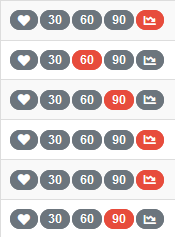
The different types of alerts are shown as badges, with a grey badge being an inactive alert and a red badge being an active alert.
[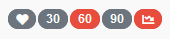](https://docs.amscomp.com/uploads/images/gallery/2021-01/image-1611790549908.png)*In order: Manual Focus, Net 30, Net 60, Net 90, 30 Day Performance.*
*This customer is triggering the Net 60 and 30 Day Performance alerts.*
#####
##### Added Customer Alert CPMailer Block
The new "Customer Alert" CPMailer block contains a list of customers who have triggered an alert based on their performance over the last 30 days. These alerts are the same ones that cause them to appear in the focus list in the CounterCRM module, and the same as the ones that appear in their CounterCRM profile.
This report block is always calculated over a 30 day period, regardless of the frequency of the report.
##### Sending CounterMessages from Within QuickDial
Via the CounterMessage tab it is now possible to send a CounterMessage tied to the current customer through QuickDial. The interface is the same as you would expect from the CounterMessage module, with the customer field pre-populated.
##### Basic Audit Log
This update introduces a basic audit log that is available to admin users. To start, the audit log tracks the following events:
- User login
- CounterMessage creation
- User password/email/name changes
- User Impersonation Events ("Log In As")
- WebReport signin
This list is expected to expand in future versions as features are added and changed.
### Removed
##### CPMailer Special Reports
The CPMailer Special Reports used to only consist of a weekly/monthly "Customer Alerts" email. Now that customer alerts are available in a standard CPMailer block this report serves no purpose - and since it was the only report in this space, the CPMailer Special Reports page has been removed.
**Note:** There is no automatic migration between the Special Reports and the new CPMailer report block. If you wish for each salesperson to continue to receive this report, it must be added to a CPMailer report.
### Bug Fixes/Small Changes
##### Fixed Stale Inventory Bug
Fixed an issue in the nightly upload process that was preventing inventory values from being calculated correctly.
##### Top Sales by Clerk
When filtering the FlightDeck Dashboard for a specific customer, the "Top Clerks" graph now properly renders again.
##### User Goals Display
Fixed an issue that could cause user goals to not render properly when trying to view all sales goals, which would result in the page infinitely loading.
##### Password Reset Functionality
Fixed an issue where the password reset function would sometimes get stuck when processing an invalid request for a password reset.
# V1.3.3
### New Features/Enhancements
##### Report Generator Exports Converted Data
Using the report generator, changes made to data via the "Convert \_\_\_\_\_" buttons after generating a report are now exported using the buttons at the top of the report. "Convert Salesperson" has also been added as an option.
[](https://docs.amscomp.com/uploads/images/gallery/2021-01/image-1611604657005.png)
##### Import "firstAdded" for Individual Items in Inventory
The date an item first appeared in inventory is now tracked by the COUNTERPOINT Cloud Platform. In some existing breakdowns, such as the "Inventory Old Stock" table if enabled will use this data to filter out items that do not yet have any sales.
##### Export Data from WebReport
Added in a CSV export option for data associated with WebReports. This should help accommodate reports with a width larger than the page, but still requires that you return to the WebReport in order to sign.
##### Direct Link from Current Version to Release Notes
The home page after you log in now includes a link in the "Current Version" tile taking you to the docs page for the release notes.
[](https://docs.amscomp.com/uploads/images/gallery/2021-01/image-1611604579414.png)
---
### Bug Fixes/Small Changes
##### Data Import Stability
Fixed a scenario that could cause upload data to not be imported correctly during the nightly process.
##### Nightly Process Stability
Fixed a series of scenarios where some actions (CPMailer Reports, WebReports, Password Reset Requests) could fail to be sent out after network issues occur, and require manual intervention.
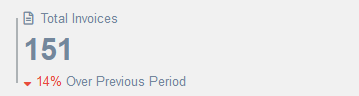
##### QuickDial Invoice Count Restored
Fixed an issue with the Invoice Count tile in QuickDial always displaying 0, or an incorrect value when using an account that does not have permission to access data from one or more branches a customer has purchased from.
[](https://docs.amscomp.com/uploads/images/gallery/2021-01/image-1611604718104.png)
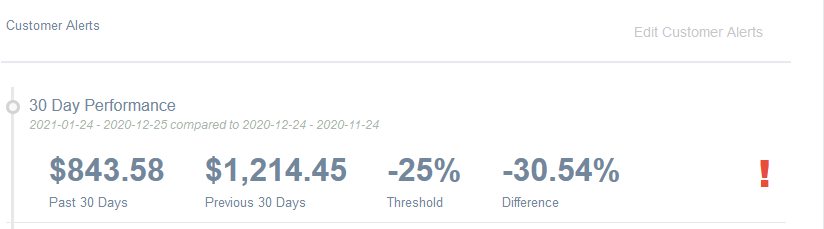
##### CounterCRM Recent Activity - Customer Alerts Labels Changed
Changed some of the labels under the Customer Alerts tab of the Recent Activity panel to clarify which dates are being used in the displayed comparisons.
[](https://docs.amscomp.com/uploads/images/gallery/2021-01/image-1611604776489.png)
#####
##### Fix Auto-Targeted Customer List Displaying
Introduced in version 1.3.2, the automatic targeted customers based on customer alerts would only display when you had at least 1 customer manually targeted. With this fixed, the "Targeted Customers" is now the default display for the CounterCRM Customer listing. This allows you to see a list of your customers as well as which alerts are being triggered at a glance. Of course if you're looking for a specific customer, the "All Customers" panel is still available via a button at the top.
[](https://docs.amscomp.com/uploads/images/gallery/2021-01/image-1611773782367.png)
##### Add Border Around Panel Menu Buttons
Some of the panels are gaining different views you can switch between, but it wasn't always immediately obvious if you weren't expecting it. As the CounterCRM customer lookup page now features these buttons, we've added a border around the buttons which should help make it a bit more obvious when there are multiple views available.
[](https://docs.amscomp.com/uploads/images/gallery/2021-01/image-1611786326540.png)
# V1.3.4
### New Features/Enhancements
##### New Fields
There have been a number of new fields added to the custom report generator
- Sales Product Group
- Linetype
- Product Return Rate
- Warranty Return Rate (%)
- Warranty Return $
- Product Return $
- Core Return $
#### Enhancements to FlightDeck Sales Breakdown Table
The FlightDeck sales breakdown table has been updated to list all breakdown options along the top, and the new Product Group has been added as an option
[](https://docs.amscomp.com/uploads/images/gallery/2021-03/image-1615407272524.png)
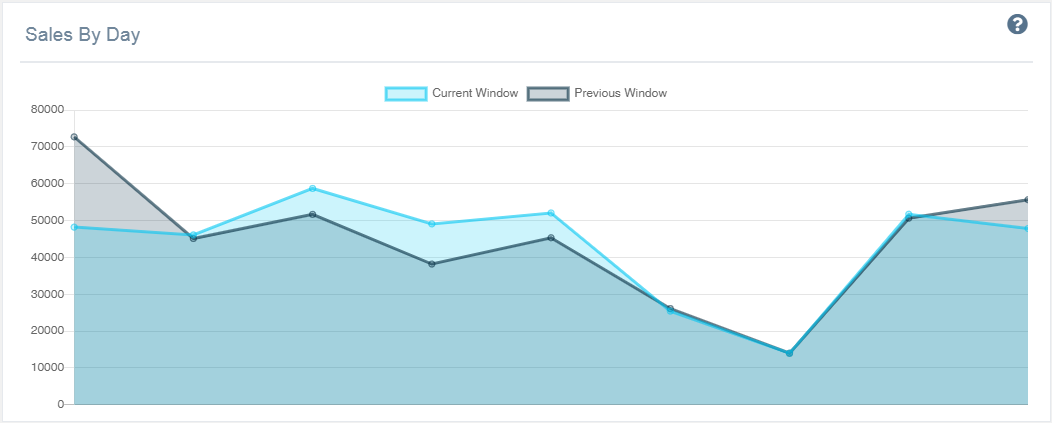
#### Enhancements to FlightDeck Graphs
The FlightDeck graphs have been beautified slightly to render differently.
[](https://docs.amscomp.com/uploads/images/gallery/2021-03/image-1615407307422.png)
### Small Changes / Bug Fixes
- Fix to bug in password reset function
- Fix to bug in branch conversion routine within custom report generator.
# V1.4.0
## V1.4.0
### New Features /Enhancements
#### Report Generator Rework
As part of some upcoming features, the Report Generator has been rewritten to improve the flow of creating a new or viewing a saved report.
When you generate a report, it now displays the report content in a modal:
[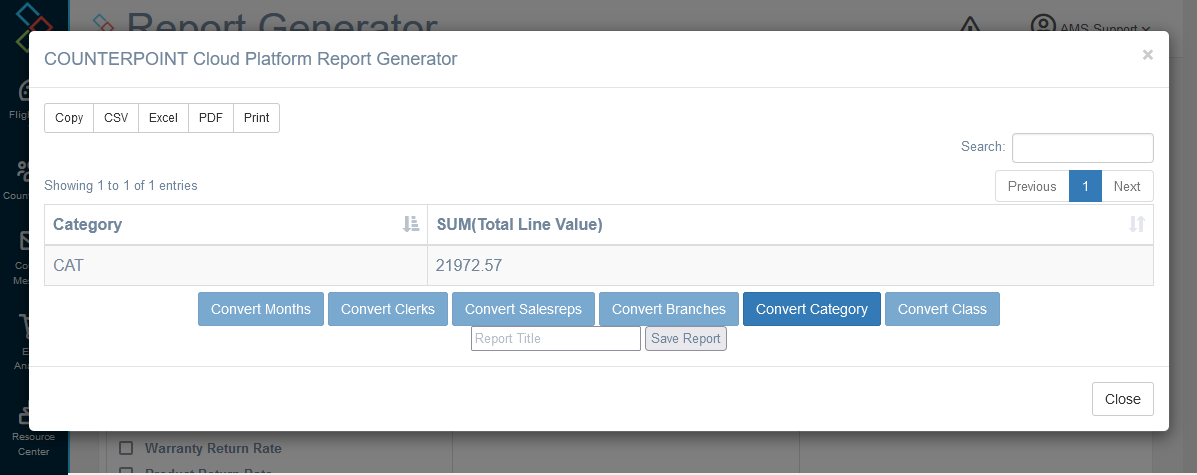](https://docs.amscomp.com/uploads/images/gallery/2021-09/image-1632345629797.png)
Which should be functionally the same as the previous method for displaying the data.
The Saved Reports page has received some updates, including some exciting new features:
[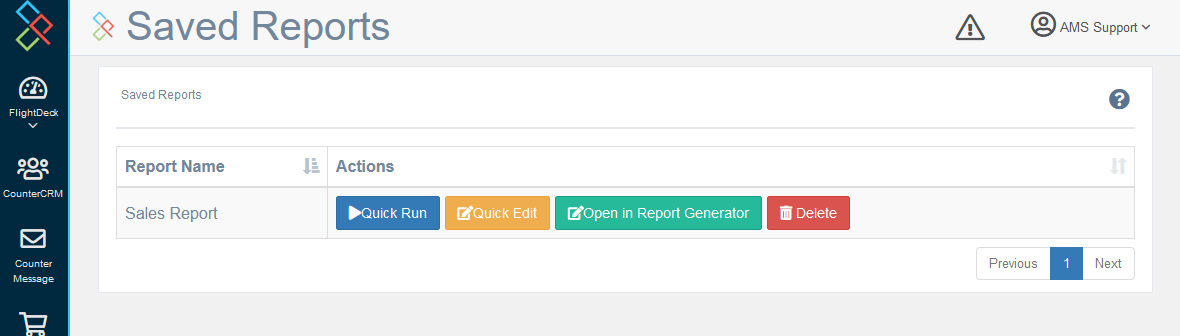](https://docs.amscomp.com/uploads/images/gallery/2021-09/image-1632345747913.png)
Notably, the first two buttons are new:
**Quick Run**: opens the report in a modal much like seen above, without leaving the Saved Reports page.
**Quick Edit:** opens a small modal allowing you to adjust the filters and date range (if applicable) of the report before running it.
[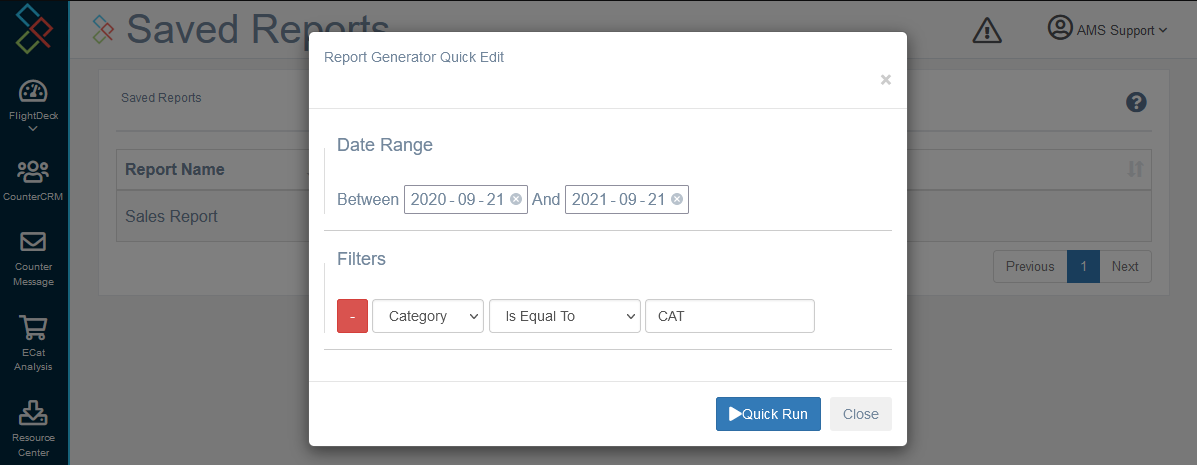](https://docs.amscomp.com/uploads/images/gallery/2021-09/image-1632346300774.png)
Additionally some of the placements of the fields in the report generator have moved, and there is no longer a default report type selected.
Unfortunately, **old saved reports are not compatible with this new format**. If you need to know what fields you had used in a previous report, please contact AMS for assistance.
### Inventory Old Stock Breakdown
The Old Stock table in the Inventory Dashboard now has a new column, "actions":
[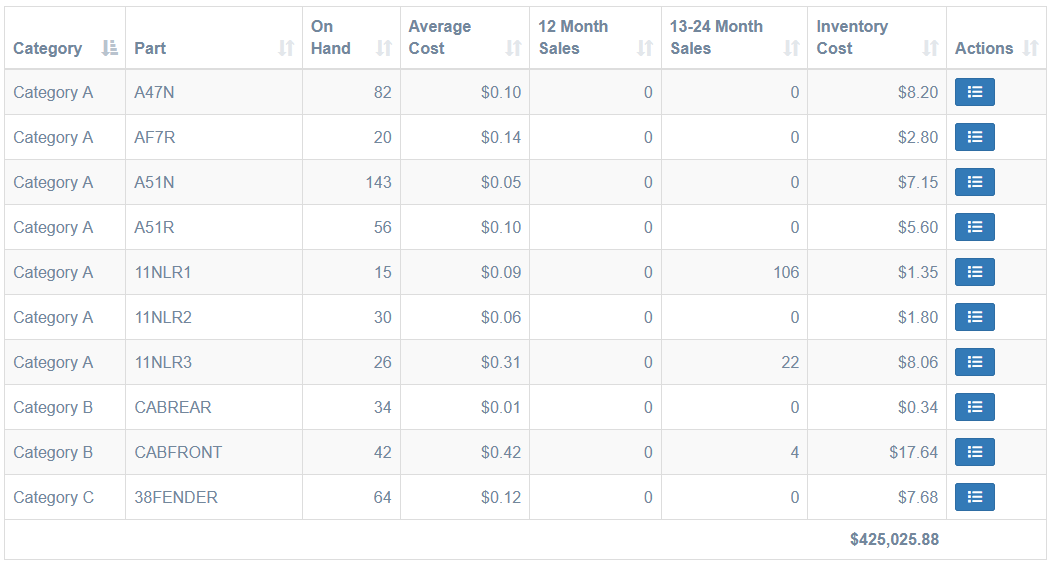](https://docs.amscomp.com/uploads/images/gallery/2021-09/image-1632355121407.png)
This button brings up a list of branches for which this product is considered "old stock" which should help clarify which branches are causing a product to show up without having to cycle through each of the branches individually.
[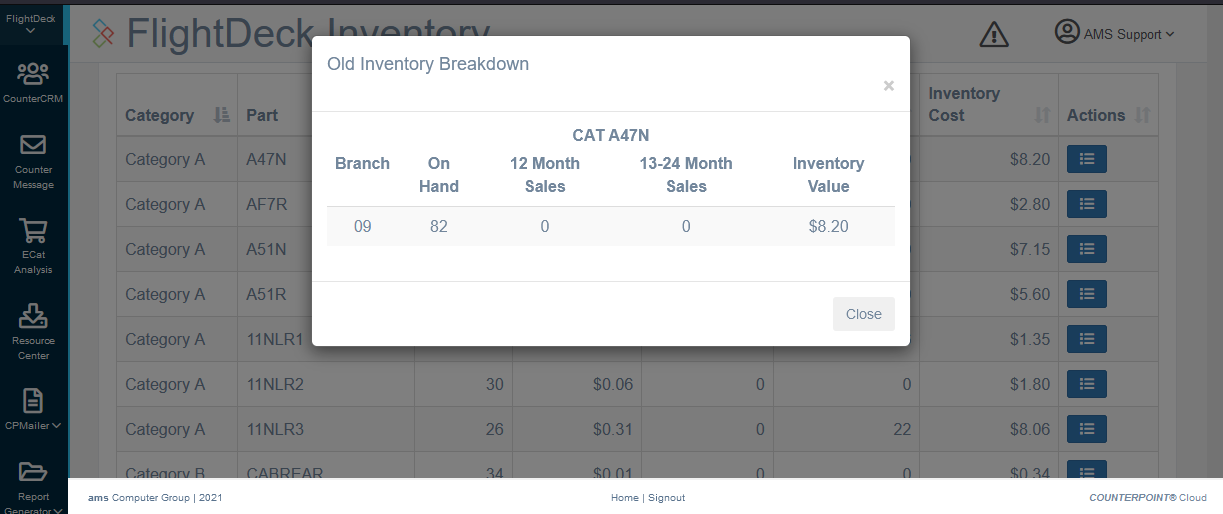](https://docs.amscomp.com/uploads/images/gallery/2021-09/image-1632355246854.png)
### QuickDial Shows Active Calls
In the QuickDial module with PBX integration enabled, any active calls are now displayed from the customer lookup screen.
[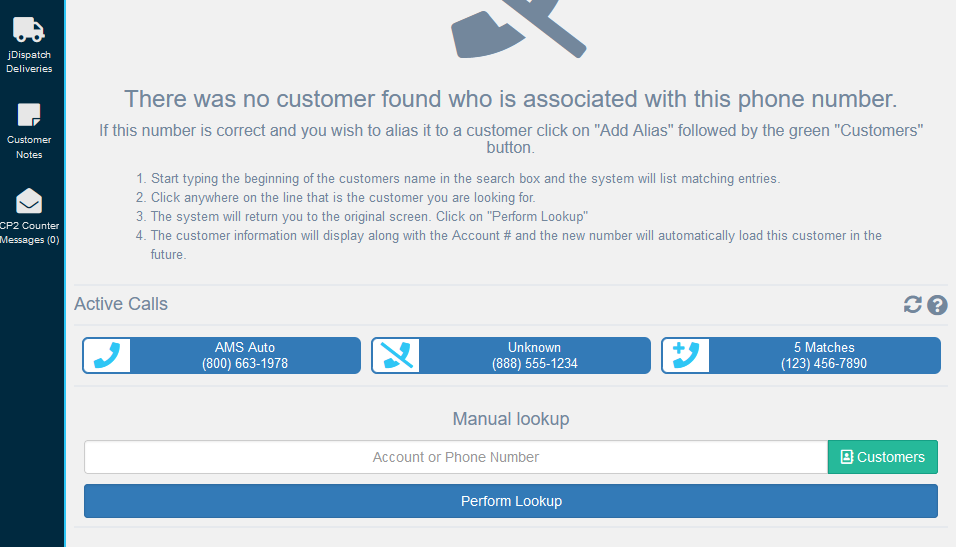](https://docs.amscomp.com/uploads/images/gallery/2021-09/image-1632422077800.png)
This aims to make the QuickDial module much more approachable for companies that don't wish to use a queue-based call answering program, and makes it easier for an agent to support a customer who was previously placed on hold. Clicking on the element will navigate to the QuickDial screen relevant for that call, as if they had just called in.
Up to 15 calls can be displayed here, where any call which the COUNTERPOINT Cloud Platform has not received notice that the call ended yet within the last hour is displayed. The display checks for new calls every 10 seconds.
### Small Changes / Bug Fixes
- The "Prebuilt Report" *Sales Table* now includes a summary row at the bottom.
- Added nightly procedure to fill in the *Customer Name* field on *Ship To*s that do not have a name assigned to them.
- Introduced changes and GUI interfaces for API keys as we get ready to add more features that utilize them
- Fixed some API calls having optional arguments that didn't have default values associated with them
- Fixed "Gross Sales" tile in CounterCRM not functioning correctly
- Fixed salesperson restrictions not applying correctly in some data breakdowns
- Fixed an issue that was preventing nightly routines from running correctly for newer accounts
- Added more automated tests that are run automatically to catch errors before new features are released
- Switched some libraries from external sources to being hosted internally, so page loading times should be more uniform
- Updated some libraries to the latest versions available
- Added a breakdown "summary' row to the Prebuilt Report "Sales Table"
- Fixed Flightdeck's "Top Clerks" graph not having the account filter applied correctly
- A user's password is now required to change their email address.
- A new nightly procedure to fill in the Customer Name field on shiptos that do not have a name associated with them.
- Rewrote the ACA data mapping procedure to be more efficient.
As well as numerous tiny fixes, and behind-the-scenes upgrades to increase performance and gt ready for exciting changes we have planned!
# V1.4.1
## V1.4.1
### New Features/Improvements
#### Added a "Fiscal Year" selection to time-based comparisons
[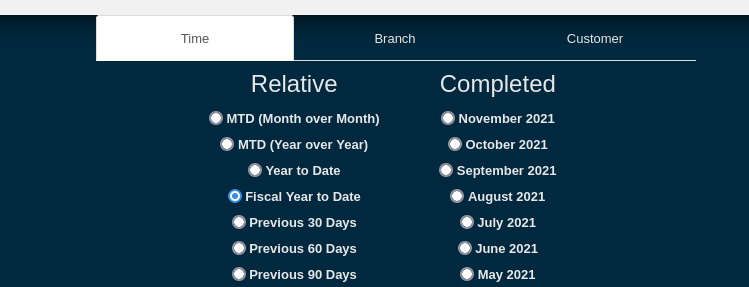](https://docs.amscomp.com/uploads/images/gallery/2021-12/image-1639698606674.png)
Note: This relies on the "fiscalStart" setting, which defaults to "01-01". This setting is available under *Server Settings* in the *CP2 Admin* module.
#### Remove cash/retail accounts from Top Customers
The "Top Customers By Sales (GP%)" graph on the FlightDeck Dashboard now excludes accounts that are listed in the *cashCustomers* admin setting.
#### CPMailer Date Comparison Daily/Weekly Update
The CPMailer module now pulls same day of same week for its daily reports.
i.e. a Monday will always be compared to a Monday, and so on.
Additionally, weekly comparisons should now work correctly on years that have 53 weeks when they are compared to years with 52 weeks.
#### "Returns" CPMailer Block
[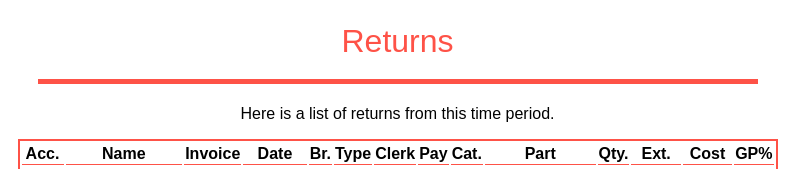](https://docs.amscomp.com/uploads/images/gallery/2021-12/image-1640115911145.png)
A new CPMailer report block adds a list of returns to your nightly, weekly, or monthly email.
This report block may be temporary, as this information may become available as part of a bigger analysis on the COUNTERPOINT Cloud Platform at a later date.
*Note: On a weekly or a monthly report, this block can get to be quite long.*
#### New Custom Reports Fields
##### Sales Reports
- **Invoice Day of Week**: The day of the week that the invoice was sold (Monday, Tuesday, etc..)
- **Invoice Hour:** The hour of the day that the invoice was sold (Represented in 24 hour format)
##### Inventory Reports
- **Avg Cost - Current**: Average cost value of items that have been sold in the past 12 months
- **Avg Cost - No Sales in 1 year:** Average cost value of items not sold in past 12 months, but sold in past 13-24 months.
- **Avg Cost - No Sales in 1 year:** Average cost value of items not sold in past 24 months, but sold in past 25-36 months.
- **Avg Cost - No Sales over 3 years:** Average cost value of items not sold in past 36 months.
### Small Fixes
- Fixed an issue where old files could be stuck cached in your browser, preventing you from loading the new version of a module
- Updated the list of columns available in the Report Generator
- Removed duplicate columns from being displayed in the Report Generator
- Modified the Minimum and Maximum columns on an Inventory report to work properly with filters
- Fixed the Quick Edit UI not displaying properly when editing a saved report
- Restored the export buttons on the Old Stock Report table
# V 1.4.2
## V 1.4.2
#### New Features/Improvements
##### Improved Styling
The style of the COUNTERPOINT Cloud Platform looks a little different with the release of 1.4.2. These style changes are necessary as we update the libraries that power The Cloud Platform, and represent a lot of work in making sure we're able to offer features at the forefront of what web browsers are capable of. There's too many changes to list them all over here, but see the screenshots of various features for examples.
##### New Administration Page
The administration page no longer hides analytics, because that didn't make much sense. Instead, the page is the new home for administrator-level options and functions.
[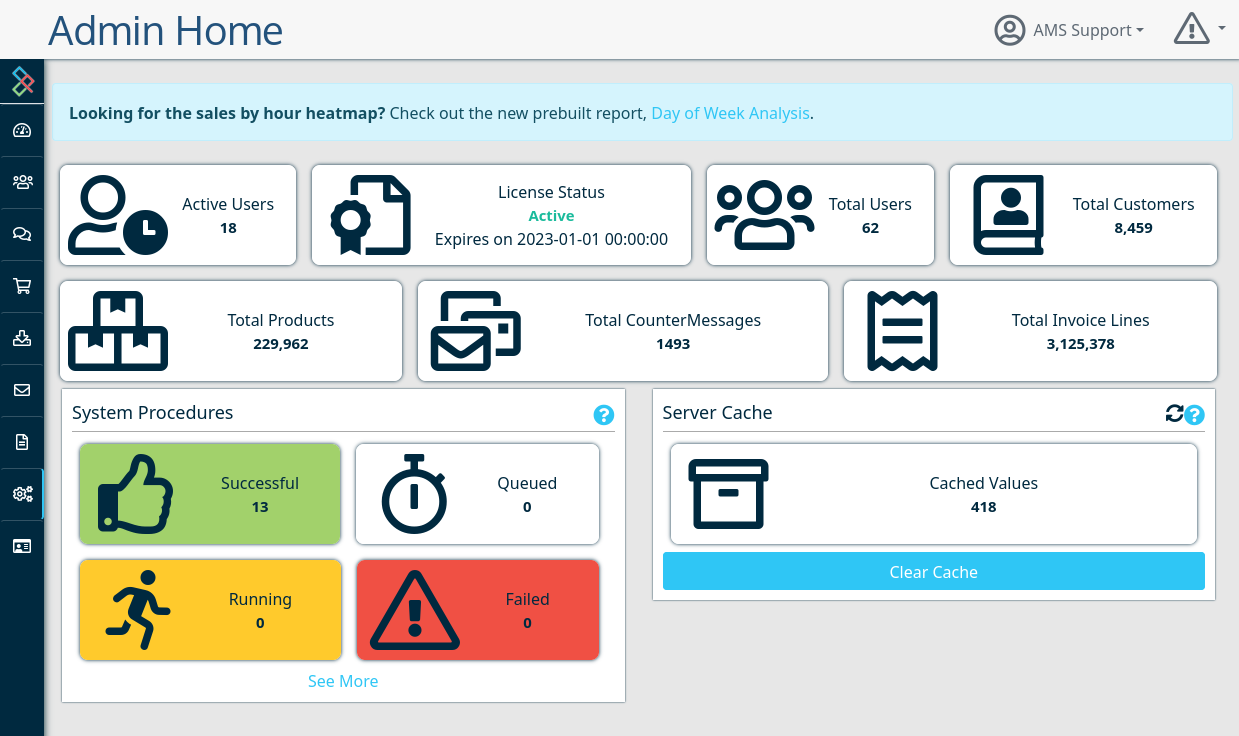](https://docs.amscomp.com/uploads/images/gallery/2022-04/image-1651269557877.png)
This new admin page still gives a instance-wide view of the amount of data involved, but now it includes the ability to clear cached values, as well as see and run the data procedures that process data that powers the COUNTERPOINT Cloud Platform.
##### Updated Filter Selection Header
[](https://docs.amscomp.com/uploads/images/gallery/2022-05/image-1652456565129.png)
The filter selection bar has been modified to be more streamlined, providing more visibility of your statistics onscreen. Clicking the 'Current Data Filters' will present you with the ability to modify the filters.
##### Day of Week Analysis Report
Replacing the sales heatmap that used to live on the administration page, the Day of Week Analysis Report in the Prebuilt Reports module offers a breakdown of sales per day of week per hour over a given period.
[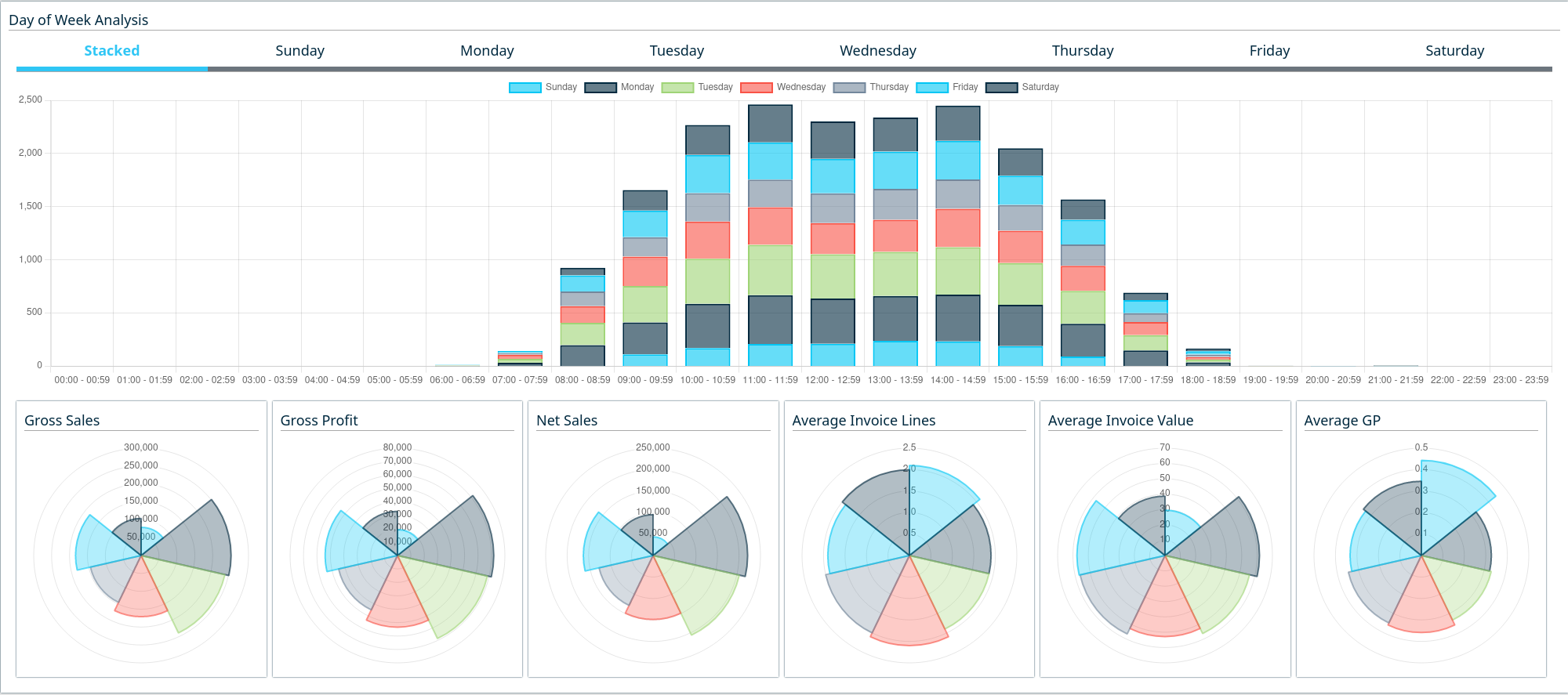](https://docs.amscomp.com/uploads/images/gallery/2022-04/image-1651270361672.png)
##### Clerk Analysis Report
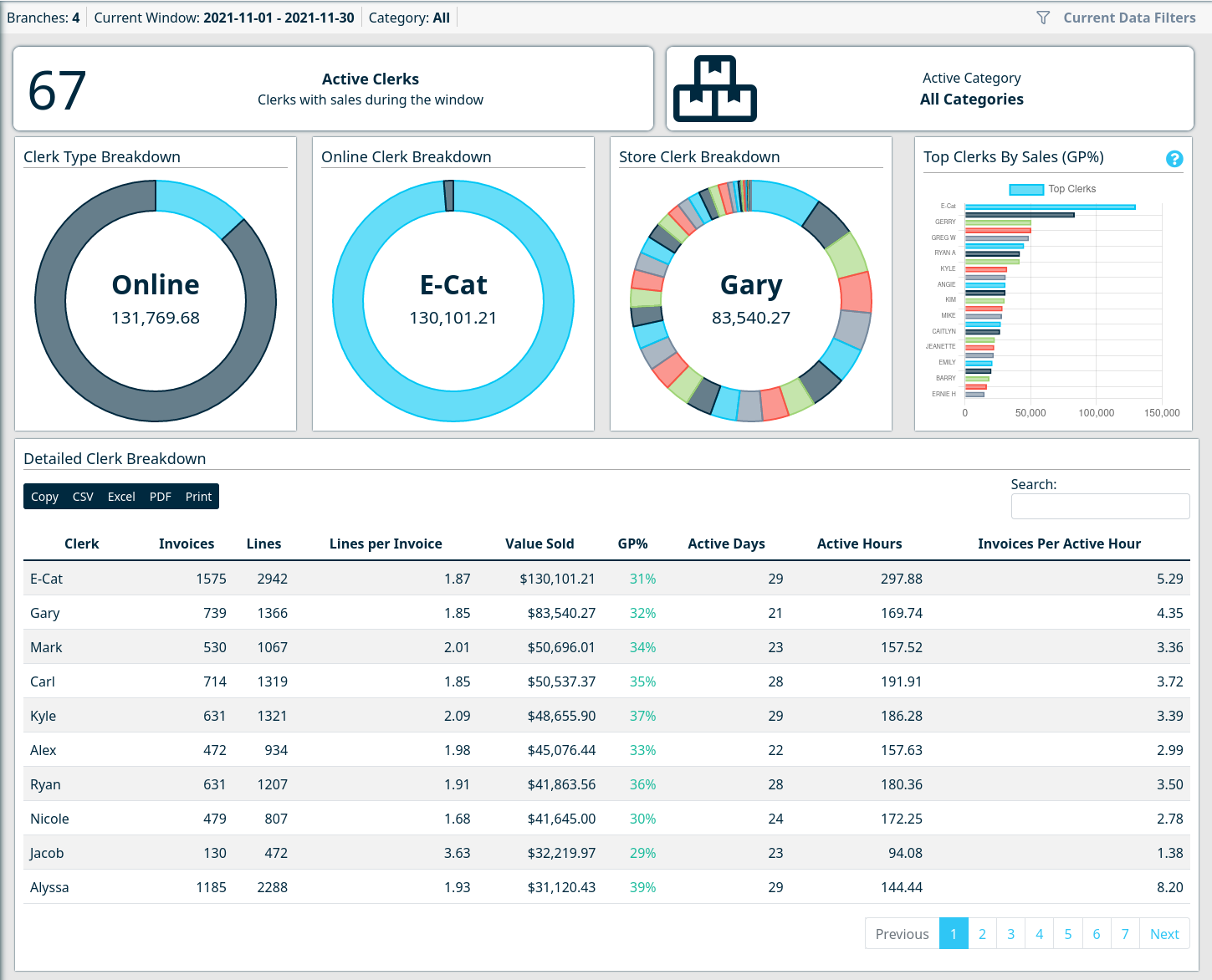
Similar to the Day of Week Analysis Report, the Clerk Analysis Report offers a breakdown of sales per clerk, and extrapolates some additional information that wasn't previously available such as "Active Hours" and "Invoices Per Active Hour".
"Active Hours" are calculated by subtracting the time of the first invoice on a day from the last invoice on a day for a single clerk.
[](https://docs.amscomp.com/uploads/images/gallery/2022-04/image-1651270672041.png)
##### Stacked CounterCRM Monthly Sales History Graph
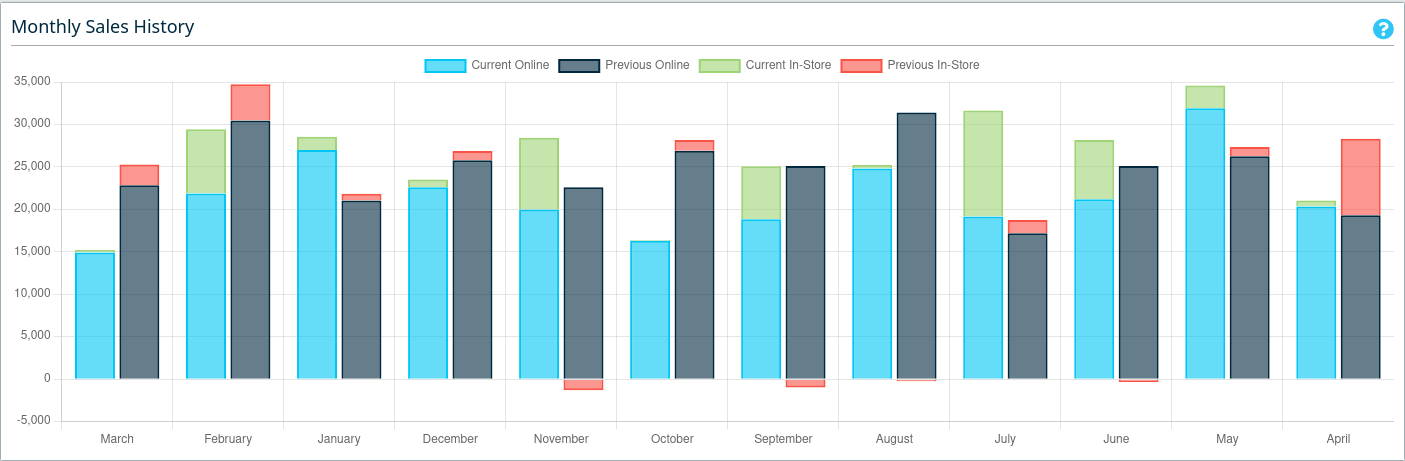
Alongside being updated to a newer library version, the Monthly Sales History graph is now broken out into "online" and "in-store" sales.
[](https://docs.amscomp.com/uploads/images/gallery/2022-04/image-1651271329442.png)
##### Ability to Archive Users
In scenarios where a user needs to be disabled, the CP2 Manager User Management page now allows you to archive a user. Select the user in question and, under the 'Special Actions' tab is the option to archive the user.
[](https://docs.amscomp.com/uploads/images/gallery/2022-05/image-1652456751513.png)
This will disable their access and remove them from user listings.
##### Addition of Bin Location
The bin location field has now been added to the Custom Report Generator screen
[](https://docs.amscomp.com/uploads/images/gallery/2022-05/image-1652895798250.png)
#### Small Fixes
- Fix performance of WebReport Schema User selection when many WebReport schemas have Andbeen created
- Modified the labels and icons of some sidebar categories to better represent their contents
- Tons of small changes with the new theme and library updates
# V 1.4.3
New Features/Improvements
Below is a complete listing of the new features included in this version
### New Flightdeck Data Filter Period
- Ability to display FlightDeck data for the past 12 months, compared to the previous 12 months
### Additional Sales Flightdeck Metrics
We've added a number of new KPIs and sales metric breakouts to the Sales Flightdeck dashboard
#### Cash/Charge Breakdown
Additional breakouts of Cash and Charge totals have been added to the top sales panel switcher in addition to Online/In-Store
[](https://docs.amscomp.com/uploads/images/gallery/2023-03/image-1678900330993.png)
#### Monthly Sales Breakdown
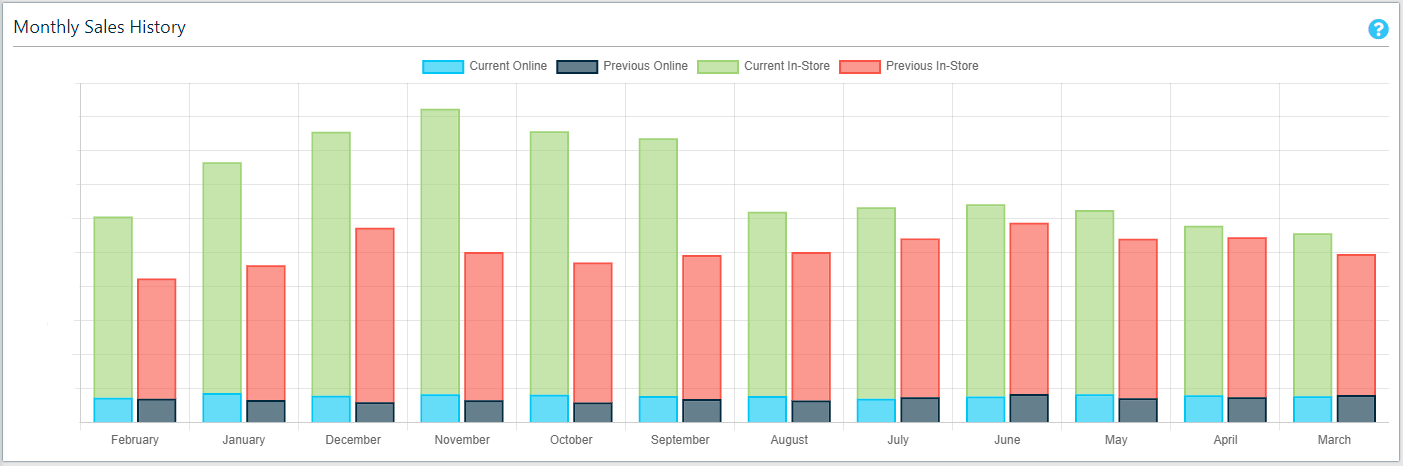
A breakdown of sales, by month, for the past 12 months. The graph compares the past 12 to the previous 12 by month and stacks in-store and online sales
[](https://docs.amscomp.com/uploads/images/gallery/2023-02/image-1677286964080.png)
#### Sales By Sales Rep
A new bar graph to display sales by sales rep for the period selected in the filters
#### Account-Based Metrics
New tiles reporting number of active customers, number of new customers and the current average days of receivables.
[](https://docs.amscomp.com/uploads/images/gallery/2023-03/image-1678738550911.png)
### Additional Inventory Flightdeck Metrics
All new metrics in the inventory dashboard will update based off of the values entered in the data filters.
#### Past 12 Month Inventory Value
A graph has been added to display trends in average inventory value over the past 12 months.
#### Aged Inventory Summary
We've added in a new 'Aged Inventory Summary' panel to give you quick visibility of your inventory aging, up to 3 years. This panel also reacts to the filters you have set for your inventory Flightdeck.
[](https://docs.amscomp.com/uploads/images/gallery/2022-12/image-1670540740477.png)
#### Historic Graphed Metrics
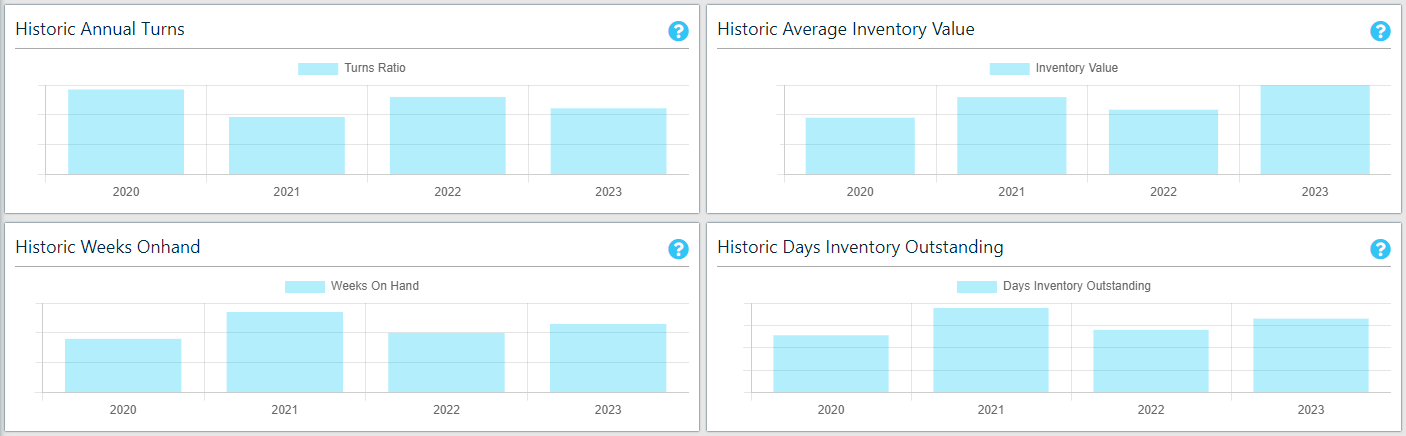
We've added in 4 new graphs to show historic trends in:
- Inventory Value
- Inventory Turns Ratio
- Days of Inventory Outstanding
- Weeks of Inventory On Hand
[](https://docs.amscomp.com/uploads/images/gallery/2023-02/image-1677287047208.png)
#### Additional Summary KPI Panel
We've also added in another summary panel of inventory metrics for the previous 12 months
[](https://docs.amscomp.com/uploads/images/gallery/2023-02/image-1676433685247.png)
This panel includes:
- Average Unit Cost - Average cost of a single unit based on entire inventory value divided by number of units onhand
- Stock to Sales Ratio - Average inventory value / Total sales for the past 12 months, represented as a percentage
- Weeks On Hand - Average inventory value / Total cost of sales for the past 12 months \* 52 weeks
- Days Inventory Outstanding - Average inventory value / Total cost of sales for the past 12 months \* the number of days in the year
#### Updates to Low Stock Table
Also in your Inventory Flightdeck dashboard, we have added 2 new columns to the Low Stock table
- **13-24 month sales:** The total sales of this item between 1 and 2 years
- **30 day demand:** Based on sales, this is the demand of product needed in the next 30 days
[](https://docs.amscomp.com/uploads/images/gallery/2023-02/image-1677287122257.png)
### More Custom Report Fields
#### Aggregate Fields
We have added a number of new aggregate fields to the custom reports:
- **Combined Customer/Ship To Name:** A field that will combine multiple ship-to names into one column when running a report on account only
- **Total Charge Sales:** A calculated total value of charge sales for your selection
- **Total Cash Sales:** A calculated total value of 'cash' (non charge) sales for your selection
- XX Day Aged Charge Sales - Total charge sales values, aged to correspond with Customer aged AR balances
- **Total Returns in Dollars**
- Product Returns
- Core Returns
- Warranty Returns
- **Total Defective Onhand:** A calculated total of the defective onhand based on your report criteria
- **Total Lost Sales:** A calculated total of the lost sales based on your report criteria
- **Total Customer Backorder:** A calculated total of the customer backorders based on your report criteria
- **Total Supplier Backorder:** A calculated total of the supplier backorder based on your report criteria
#### New Type of Aggregate Field
We have added a new **Historic Sales** group of fields, which include a number of segmented total values
These fields still adhere to the date range filter, so to get accurate values you must select a date range that would include the selected dates. For example, to get 'Total Sales - 3 Year', your date range must go back over 3 years.
- **Total Sales -** We have added fields to break provide Total Sales $ by the following:
- Per month for the past 6 months
- Total Sales - 1 Year
- Total Sales - 2 Year
- Total Sales - 3 Year
- Previous 12 months total
- YTD total
- Previous YTD total
- **Total Quantity -** We have added fields to break provide total quantity sold by the following:
- Per month for the past 6 months
- Last 12 months total
- Previous 12 months total
- YTD total
- Previous YTD total
- **Charge Sales - Month**: We have added in the ability to add in charge sales totals, specifically by month, for the past 6 months
#### Additional Sales Fields
- Levy Cost
- Levy Value
#### Additional Customer Fields
- Credit Limit
- Credit Rating
- Date Created
- AR System Type
- Customer Type
- Has Statement
- Contracts Allowed
#### ALL Inventory Fields
We have also added in all fields found within the COUNTERPOINT inventory. This includes all fields present in the product maintenance screen within Counterpoint
#### Field Descriptions
We have made a number of updates to the summary / aggregate field descriptions to better identify their data and use.
### Custom Report Enhancements
#### New Filters
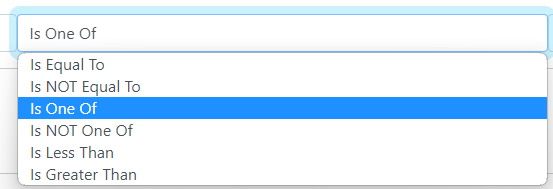
Custom reports now have the ability to add a 'Not Equal To', 'Is One Of' or 'Is NOT One Of' filter
[](https://docs.amscomp.com/uploads/images/gallery/2023-04/image-1682370351874.png)
- Is NOT Equal To: The listings will not be returned for any records not matching this criteria
- Is One Of: Listings will be returned for any values matching one of the listed options. Options must be separated by a pipe "|" symbol
- Is NOT One Of: Listings will NOT be returned for any values matching one of the listed options. Options must be separated by a pipe "|" symbol
This new feature also extends to allowing users to filter on 'not empty' or 'empty', by entering a space in the **Value** field.
#### User Specific Reports
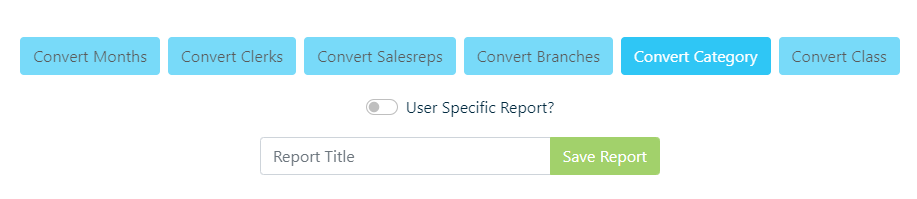
- When saving a report, you can opt for the report to be 'User Specific', meaning that only the user who created the report will see it in the saved reports listing.
[](https://docs.amscomp.com/uploads/images/gallery/2023-02/image-1675368786083.png)
### Web Report Enhancements
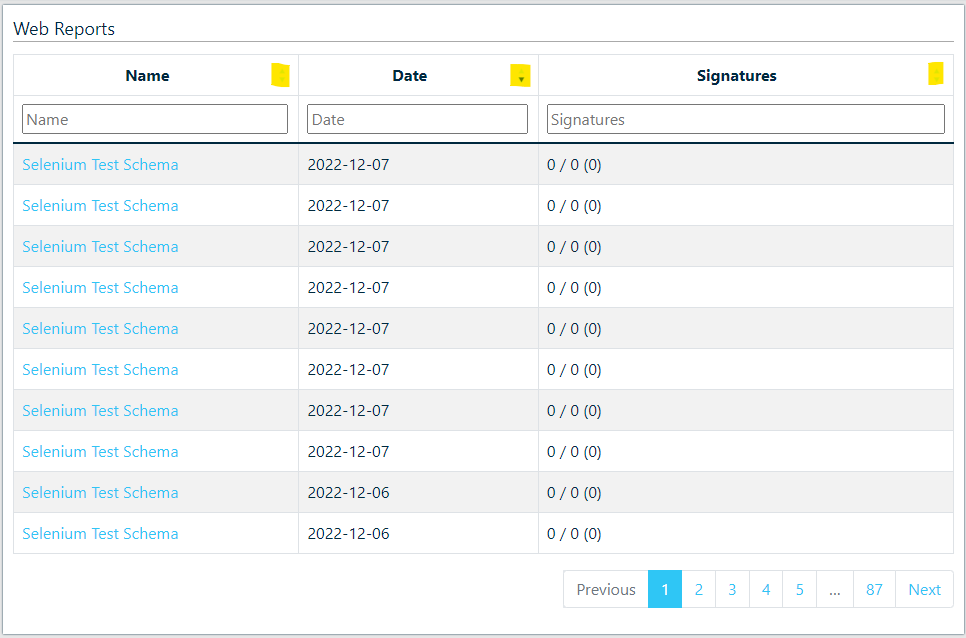
- Added column sorting and filtering to the web report listing
[](https://docs.amscomp.com/uploads/images/gallery/2022-12/image-1670540874553.png)
### New Prebuilt Reports
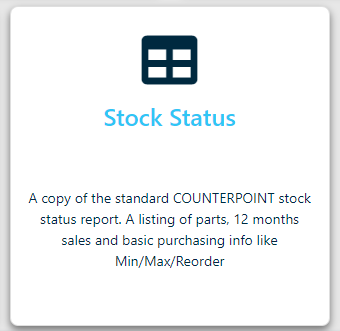
- Added in a Cloud equivalent to the Counterpoint Stock Status Report. This report requires a category be entered and can be run for one or many branches
[](https://docs.amscomp.com/uploads/images/gallery/2023-03/image-1678990242533.png)
- Added a new 'Sales History By Product Group' report which shows the same sales values as in the Sales History By Category report, but groups them by Product Group
[](https://docs.amscomp.com/uploads/images/gallery/2023-03/image-1679687814849.png)
- Added a new 'Consolidated Sales' report which shows current sales compared to last year, as well as a 4 month breakdown of sales increase/drop. Also includes current inventory value.
[](https://docs.amscomp.com/uploads/images/gallery/2023-03/image-1678990269058.png)
### Historic Inventory Predefined Report Update
- Modified the report to add columns for a 3rd year of history
### General Predefined Report Enhancements
- Style changes to the predefined report landing page
- Modifications to some of the predefined report descriptions
- Modified the filtering on the sales listing table to be a 'contains' type search vs. an exact match.
- Modified the Historic Sales report to follow the standard branch filters used throughout the dashboard.
- No longer limited to a single branch
- Modified the detailed invoice search/listing report with the following
- Increased number of records per page
- Modified the font for easier reading
- Changed the category field to report category code vs. category name
### Monthly Inventory Quantity Tracking
In addition to tracking the monthly inventory valuation, we will now also be tracking monthly onhand totals by category. The historic reporting on this will be available in a future release
### CPMailer Enhancements
- Changed email headings for better readability
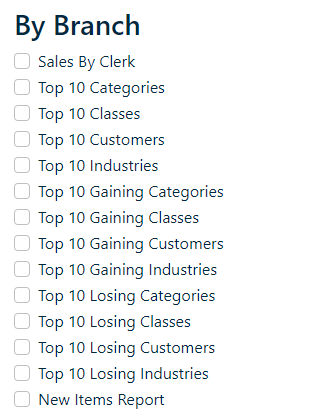
- Addition of a new class of CPMailer overnight reports. 'By Branch' reports will email you the specified reports, broken out by branch, based on your allowed branches.
[](https://docs.amscomp.com/uploads/images/gallery/2023-03/image-1679527655481.png)
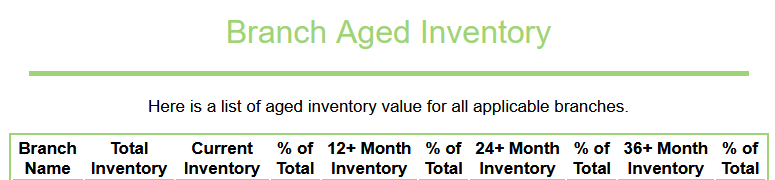
- Addition of a new 'Aged Inventory Value' report which will show a breakout of the aging of inventory, up to 36+ months, based on today
[](https://docs.amscomp.com/uploads/images/gallery/2023-03/image-1679527706478.png)
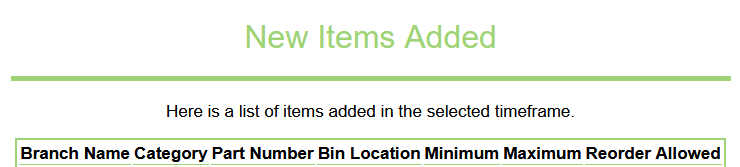
- Addition of a 'New Items' added, showing items added to the system for the timeframe of the report
[](https://docs.amscomp.com/uploads/images/gallery/2023-03/image-1679527728962.png)
### CounterCRM Enhancements
- Added new customer information tiles
- Credit Rating
- Last Invoice (Amt & Date)
- Last Payment (Amt & Date)
- Credit Limit
- Added new 'Customer Annual Statistics (Past 12 Months, Year-over-Year)' tiles beneath the monthly sales breakdown
### CounterCRM Changes
- Style changes to make for easier reading of customer notes.
- Style changes to customer information tile icons
- Style changes to make for easier reading of customer alerts.
### QuickDial Enhancements
- Added new customer information tiles
- Credit Rating
- Last Invoice (Amt & Date)
- Last Payment (Amt & Date)
- Credit Limit
## Bug Fixes
- Fixed the rounding of GP% in the prebuilt historic sales report
- Fixed the CounterCRM listing to group all customer's by Account number when more than one ship-to is available.
- Fixed a bug in the CounterCRM summary page causing the JDispatch 'All Time Deliveries' count to return blank
- Corrected the monthly sales breakout labels in CounterCRM as they were shifted off by a month
- We have modified a number of the custom field report names to make their meaning more obvious.
- Fixed a bug where ship-to numbers with different names would split when a custom report was only supposed to report on account
- Corrected table heading in Prebuilt Historic Sales report
- Fixed documentation links on all prebuilt reports
- Fixed logo size on CounterMessage reply page
- Fixed font color in CounterMessage email
- Fixed a styling bug that showed web report heading with white text on a white background
- Fixed a styling bug in the user registration screen
- Fixed a styling bug in the web report listing screen
- Fixed layout inconsistencies in Admin alert and Address book maintenance pages
- Minor style changes on e-cat analysis page to bring it in line with other page styles
- Minor style changes on 'Current Filter' selection tab
- Corrected a problem where the clerk analysis page would not show properly when there were $0 in web sales
- Corrected a problem in the Hourly sales analysis report where the stacked graph would not display if there were $0 sales on a given day
- Fixed a bug in the daily sales 'radar' graphs that incorrectly displayed Saturday sales as Sunday
- Fixed a bug in QuickDial which caused the page to not render properly on certain account
- Corrected the 'Forecasted Annual Turns' calculation as it was reporting too high in some cases.
# V 1.4.4
## Overview
In this latest update for our online business analytics platform, Counterpoint Cloud, we've focused on enhancing three key components.
Firstly, we've introduced Outstanding and Historic purchasing information. This feature empowers you to gain deeper insights into your purchases and supplier performance, providing you with valuable data to optimize your business decisions.
Secondly, we've conducted a comprehensive review of all CounterCRM pages, ensuring an exceptional mobile experience. We've also added new features to equip your sales representatives with the essential information they require while on the go or at a customer's location.
Lastly, we've put the finishing touches on our QuickDial module and seamlessly integrated Counterpoint Cloud with the AMS VoIP solution. This integration allows your clerks to access extended customer information and streamline order creation by simply answering the phone.
We're excited to introduce these improvements, which we believe will greatly enhance your experience with Counterpoint Cloud and help you make more informed business decisions.
## Mobile-First Style Updates
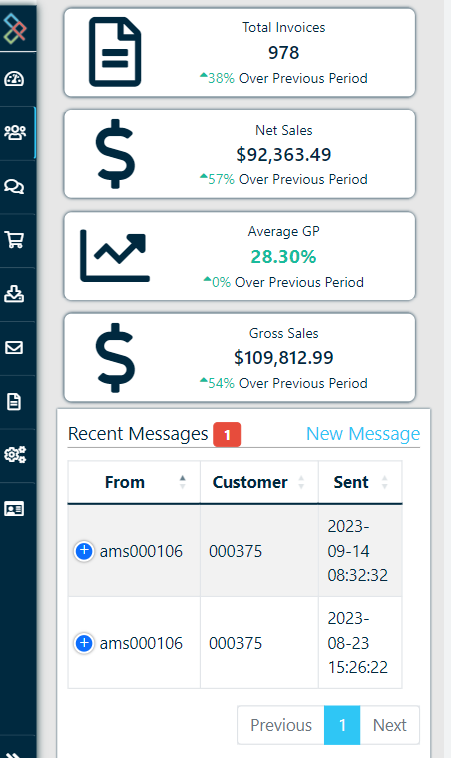
We have made a large number of improvements, across the board in the Counterpoint Cloud Platform, to make the application more friendly on your mobile device.
Key focuses for this project were to ensure tables were accessible (notice the blue + symbol on table rows), graphs were automatically resized and that button contents and fonts were legible on all devices.
While these changes have been made in all modules, you will notice the greatest improvements within the CounterCRM and FlightDeck modules.
[](https://docs.amscomp.com/uploads/images/gallery/2023-09/image-1694705651212.png)
## CounterCRM
### Launch an autoecat session
[](https://docs.amscomp.com/uploads/images/gallery/2023-09/image-1694705499322.png)
A new customer action button that will launch a new session of autoecat (in a new window) and automatically log you in as the selected customer.
Once logged in, you can browse the catalogue as the customer, showing their pricing and place an order as if you were them.
### CounterMessages Listing
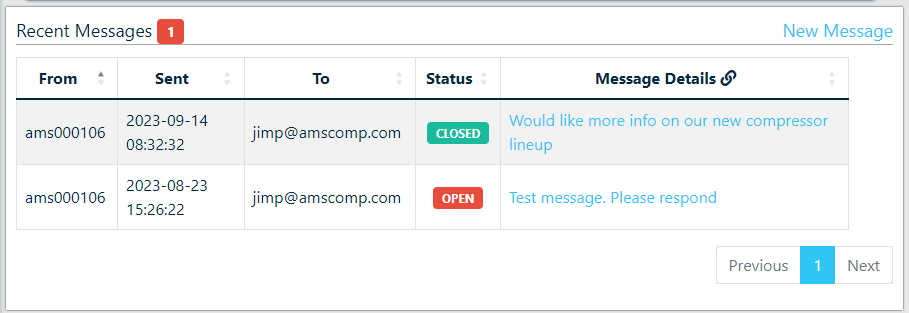
The 'Recent Messages' tab has been updated to show both open and closed messages, as well as replacing the message 'Hash' with the current status of the message.
[](https://docs.amscomp.com/uploads/images/gallery/2023-09/image-1695232052603.png)
We have also updated the message preview link to open the selected message in a new browser tab.
### PBX Integration
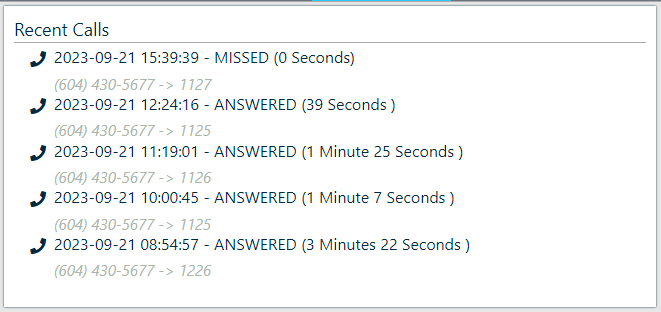
All customers who currently have an AMS VoIP solution deployed have had their PBX integration activated within the Cloud Platform. This means that all inbound and outbound calls to a customer's primary phone number will be available for review in both the CounterCRM and QuickDial modules, allowing you to confirm call volumes and duration for customers as well as confirm who a customer may have spoken with.
[](https://docs.amscomp.com/uploads/images/gallery/2023-09/image-1695337755738.png)
### Additional CRM Updates
- Added new 'Total Owing' tile to the CRM 'Quick Statistics'
## Custom Reporting - Purchasing data
We have imported ALL current and historic purchasing data into the custom report generator. This has resulted in the creation of 2 new types of custom reports
- **Outstansding POs** - These reports will pull from all current and outstanding purchase order data, linked into inventory data
- **Purchase History -** These reports will pull from all receiving data, linked into inventory data
- **Supplier Data** - All fields from your supplier screen is available on both purchasing reports.
Each of these reports contain all possible purchasing fields available as detailed fields, and basic aggregate fields under the calculated fields section.
## QuickDial Updates
#### Overview
For CP2 users who also have implemented an AMS PBX VoIP solution, the Counterpoint Cloud Platform app has been updated with a number of enhancements around QuickDial.
The QuickDial integration module allows a tie-in between your phone system, the cloud platform and, in turn, the Counterpoint invoicing screen.
In an integrated scenario, a 'QuickDial' information page will pop up when you answer your phone, for the customer whose number is associated with the Caller ID. Within this page you get a number of key metrics
- Customer statistics like last payment, industry type, sales rep, account balances
- Month to date sales
- YTD sales graph, by month
- Current deliveries
- Detailed invoice history
You can also opt to launch an autoecat session as that user, or even launch a Counterpoint invoice session as that customer.
#### Update Details
The updates to QuickDial in this release are related to app security, performance and porting recent CRM updates into the QuickDial module.
As well, we have made enhancements to the handling of calls answered in 'fail-over' or call-center scenarios, where the call is being answered in a location different than the one it was originally destined for. These enhancements ensure that the Counterpoint session opened from the QuickDial screen is launched in the originally dialed branch
## Windows Application
We have also released a new version of our Windows application. This utility allows you to launch the Counterpoint Cloud Platform right from your desktop!
The app is available for download here: [https://counterpoint.cloud/app.php](https://counterpoint.cloud/app.php)
Once installed, the application will auto-update with any future releases.
## FlightDeck Inventory Dashboard
- We have updated both the Low Stock and Old Stock tables to consider product demand instead of only considering product sales.
- Modified the Old Stock table to include Supplier Code and Supplier Name, as well as changed the category field from Name to code.
## Bug Fixes & Behind the Scenes Updates
- Fixed a bug when adding new notes to a customer
- Modifications to data export routines to address problems with items sold in tenths
- Modified the nightly 'non-stocked' import routine to apply the default product group from Category to non stocked items.
- Fixed a bug in the CounterCRM recent call log wherein only the most recent call was showing.
- Fixed code regression that caused JDispatch location and signature pop-ups to no longer work,
- Standardized the delivery detail screens between QuickDial and CounterCRM
- Fixed a bug causing the 'new note' button in QuickDial to work intermittently
- Fixed a bug that caused the current call badges in QuickDial to show with an incorrect style applied.
- Modified the flightdeck to remove unnecessary data metrics when viewing with an account applied
- Fixed a bug that was causing the CounterCRM "Monthly Sales By" graphs to show yearly totals vs monthly
- Enhanced the nightly export routines to better handle control characters within the product description.
- Fixed the Average Days Receivable tile as it was reporting invalid values.
# V 1.4.5
## Overview
This is a minor release based on some of the early feedback from version 1.4.4
## Custom Reporting
We have imported the remaining supplier data as well as introduced another report type
- **Supplier Sales -** Similar to the customer sales, but tying Sales, Inventory and Supplier data
We have also imported some additional sales fields
- Bin Location
- Sell Price Level
- Discount at time of sale
## Locked Items Report
A new report has been added to your CPMailer listing. The locked items report will report any items with a '\*' locked price level assigned to them
## Bug Fixes & Behind the Scenes Updates
- Fixed the historic sales report where the branch selection had been turned off
# V 1.4.6
## Overview
This is a minor release based on some of the early feedback from version 1.4.4
## Custom Reporting
We have imported the remaining supplier data as well as introduced another report type
- **Supplier Sales -** Similar to the customer sales, but tying Sales, Inventory and Supplier data
We have also imported some additional sales fields
- Bin Location
- Sell Price Level
- Discount at time of sale
As well, the Inventory report has demand broken out by the last 12 months
## New CPMailer Reports
- **Locked Items Report:** The locked items report will report any items with a '\*' locked price level assigned to them
- **Adjustments Report:** The adjustments report will report any adjustments processed in the timeframe of your report
- **Invoice Summary Register:** A copy of the nightly Counterpoint invoice summary register
- **Invoice Register:** A copy of the nightly Counterpoint invoice register
## New Prebuilt Reports
- **Specials Report** - Full listing of specials
- **Items On Order Report -** A copy of the Counterpoint Items On Order By Supplier report with a few additional fields.
- **Adjustment History:** A detailed listing of inventory adjustments
- **Supplier Sales Analysis:** A detailed analysis of items by supplier including sales, demand, purchase totals and values
- **Customer Aging Report:** A detailed customer listing with aging information as well as credit limit and current credit rating
- **Buyer Sales Analysis:** A detailed analysis of items by buyer including sales, demand, purchase totals and values
- **Critical Inventory Report:** A listing of items currently considered in a 'critical' state:
- Not enough inventory to last until the next order it set to arrive
- Out of stock and not on order
- Purchase orders past their required date
## Bug Fixes & Behind the Scenes Updates
- Fixed the historic sales report where the branch selection had been turned off
- Corrected a situation where categories removed with the 'entire category delete' routine were not being dropped from the cloud platform
- Fixed the outstanding PO report for scenarios where data was not being returned
- Fixed bug that had the emailed lost sales report showing lost sales for the current period as well as the last comparative period.
- Fixed a bug in the Supplier sales analysis that only showed items with purchasing